
Re-signing & Crash Prevention
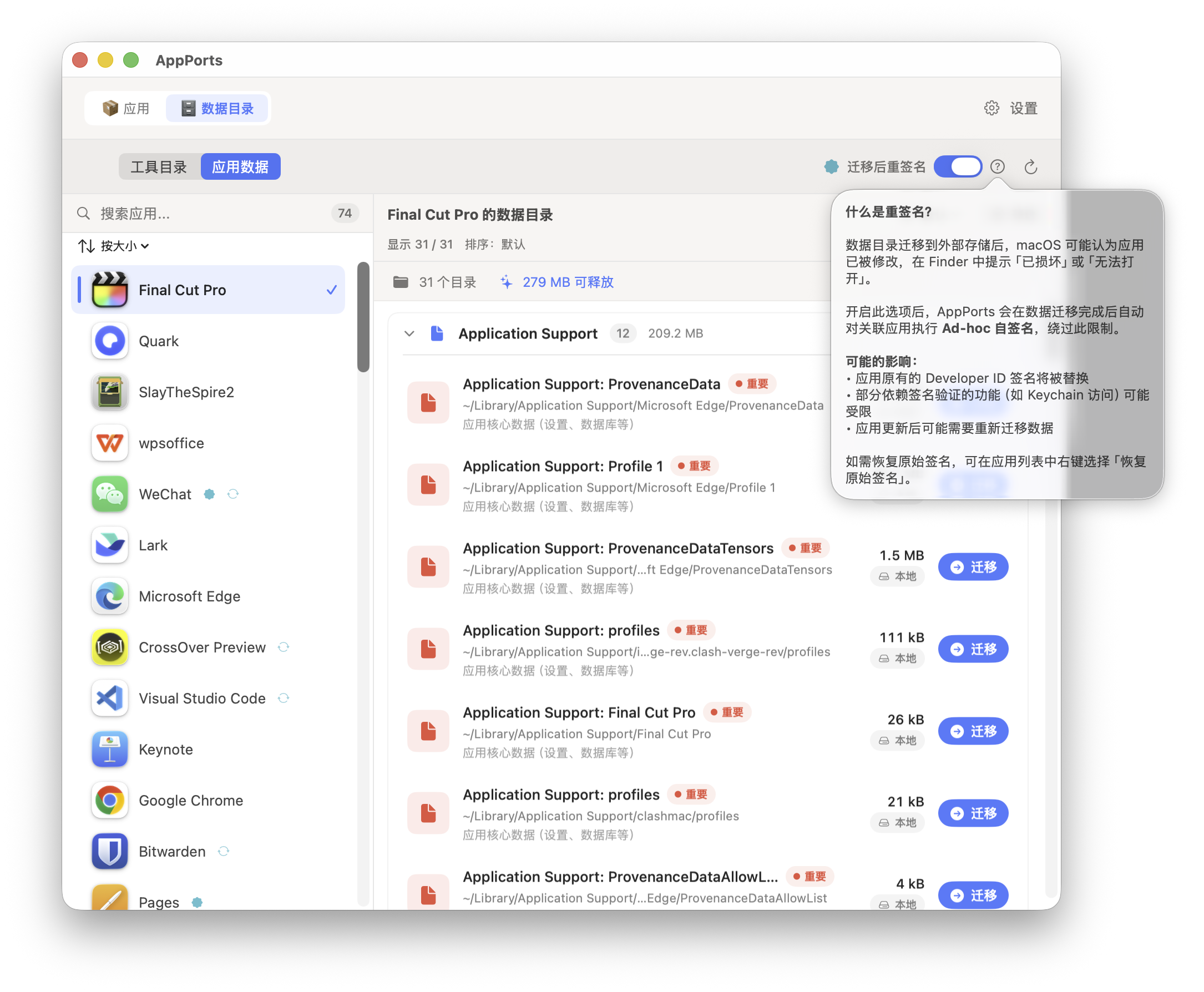
Why Apps May Crash After Data Migration
macOS's code signing mechanism (codesign) verifies the integrity of the application package, including file path structure. When AppPorts migrates an app's data directory to external storage and replaces it with a symbolic link, the signing seal is broken, causing the following issues:
- Gatekeeper Block:
codesign --verify --deep --strictdetects signature failure; the system displays a "Damaged" or "from an unidentified developer" dialog, blocking app launch - Keychain Access Disruption: Apps relying on Keychain access groups cannot read stored credentials due to signature identity changes
- Entitlements Failure: Some app entitlements are bound to the signing identity; after signature changes, entitlements mismatch
High-Risk App Types
| App Type | Risk Level | Reason |
|---|---|---|
| Sparkle self-updating apps | High | Updater may delete or replace the app, damaging symbolic links |
| Electron self-updating apps | High | electron-updater may also interfere with apps on external storage |
| Keychain-dependent apps | High | Ad-hoc signing changes the signature identity; Keychain access groups fail |
| Mac App Store apps | High | SIP protection; cannot be re-signed |
| Native self-updating apps (Chrome, Edge) | Medium | Self-update may replace external copy, invalidating local entry |
| iOS apps (Mac version) | Low | Uses Stub Portal or whole symlink; fewer signing issues |
High-Risk Data Directory Types
| Data Type | Risk Level | Reason |
|---|---|---|
~/Library/Application Support/ | Medium | App may use file locks, SQLite WAL logs, or extended attributes; may behave abnormally across symbolic links |
~/Library/Group Containers/ | Medium | Shared by multiple apps under the same Team; symbolic links may interfere with other apps |
~/Library/Preferences/ | Low-Medium | cfprefsd caches plist files; symbolic links may cause reading stale data |
~/Library/Caches/ | Low | Caches are rebuildable; most apps handle cache absence gracefully |
Re-signing Mechanism
Ad-hoc Signing
AppPorts uses Ad-hoc signing (certificate-less local signing) to fix app signatures after migration. Execution command:
codesign --force --deep --sign - <app path>Where - indicates Ad-hoc signing (without a developer certificate).
Signing Flow
flowchart TD
    A[Start re-signing] --> B[Backup original signature identity]
    B --> C{Is app locked?}
    C -->|Yes| D[Temporarily unlock uchg flag]
    C -->|No| E{Is app writable?}
    D --> E
    E =>|Not writable & root-owned| F[Try to change ownership with admin]
    E =>|Writable| G[Clean extended attributes]
    F --> G
    F -->|Failed & MAS app| H[Skip signing - SIP protection]
    G --> I[Clean bundle root directory clutter]
    I --> J{Is Contents a symlink?}
    J =>|Yes| K[Temporarily replace with real directory copy]
    J =>|No| L[Execute deep signing]
    K --> L
    L =>|Failed| M[Fallback to shallow signing]
    L =>|Success| N{Was Contents temporarily replaced?}
    M --> N
    N =>|Yes| O[Restore symbolic link]
    N =>|No| P[Re-lock uchg flag]
    O --> P
    P => Q[Signing complete]
Key Steps
Backup original signature identity: Before signing, read the app's current signature identity (parse
Authority=lines viacodesign -dvv), save to~/Library/Application Support/AppPorts/signature-backups/<BundleID>.plistClean extended attributes: Execute
xattr -crto remove resource forks, Finder info, etc., avoiding "detritus not allowed" errors during signingClean bundle root directory: Remove
.DS_Store,__MACOSX,.git,.svn, and other clutterHandle symbolic link Contents: If
Contents/is a symbolic link (Deep Contents Wrapper strategy), temporarily replace it with a real directory copy, then restore the symbolic link after signingDeep signing → shallow signing fallback: Prefer
--deepsigning (covering all nested components); if it fails due to permission or resource fork issues, fall back to shallow signing without--deepRetry mechanism: When
codesignproduces "internal error" or is terminated by SIGKILL, retry up to 2 times
Signature Backup & Restore
Backup
Backup files are stored in ~/Library/Application Support/AppPorts/signature-backups/ directory, named BundleID.plist:
| Field | Description |
|---|---|
bundleIdentifier | App's Bundle ID |
signingIdentity | Original signature identity (e.g., Developer ID Application: ... or ad-hoc) |
originalPath | Original app path |
backupDate | Backup timestamp |
Backups are triggered at these times:
- Before data directory migration (if auto-re-signing is enabled)
- Before any signing operation (idempotent; does not overwrite existing backups)
Restore
When restoring a signature, AppPorts executes different strategies based on the backed-up signature identity:
| Backed-up Signature Identity | Restore Behavior |
|---|---|
ad-hoc or empty | Execute codesign --remove-signature to remove signature; delete backup |
| Valid developer certificate identity | Check if certificate exists in Keychain. If present, re-sign with original identity |
| Valid developer certificate identity but certificate not on this machine | Fallback to Ad-hoc signing; original signature cannot be fully restored |
Restore Failure Scenarios
The following scenarios cause signature restore failure or incompleteness:
| Scenario | Result |
|---|---|
| Backup plist file does not exist | Throws noBackupFound error; cannot restore |
| Original developer certificate not in local Keychain | Falls back to Ad-hoc signing. App can launch but Keychain access groups and some entitlements may fail |
| Mac App Store apps (SIP protection) | Silently skipped. SIP prevents any modification to system app signatures |
| App directory not writable & root-owned | Attempts to change ownership via admin privileges. Fails if user cancels authorization prompt |
| Contents symbolic link target lost | copyItem fails in temporary replacement step; signing cannot be executed |
| User cancels admin authorization | Throws codesignFailed("User cancelled authorization") |
| Both deep and shallow signing failed | Error propagated upward; signing operation fails |
⚠️ About Lost Developer Certificates
The most common real-world restore failure scenario is: the original app was signed by a third-party developer (e.g., Developer ID Application: Google LLC), but the current machine's Keychain does not have the corresponding private key. In this case, the restore operation can only generate an Ad-hoc signature; the original signature identity cannot be fully restored. For apps relying on specific signature identities for Keychain access groups or enterprise configuration profiles, this may cause functional anomalies.